30 Photo Collage Maker - 10+ Layouts, Free Online
Fit 30 photos into one frame in under two minutes. 10+ ready layouts including 5x6 grid, 6x5 vertical, mosaic spread, polaroid stack, and themed 30th birthday scrapbook templates. Free, browser-based, exports at 4K - your photos never leave your device.
Make a 30 Photo CollageWhy 30 Photos Beats a 30-Slide Carousel
One 30-photo collage outperforms a 30-slide Instagram carousel on every platform that isn't Instagram - WhatsApp status, printed photo books, email signatures, framed gifts. Pi7 makes a 30 photo collage online in under two minutes with 10+ ready layouts including a 30th birthday scrapbook. Free, browser-based, exports at 4K. No signup.
Pick the collage when the photos need to live as a single image - a 30th birthday card mailed to friends, a wedding-album one-pager, a travel-diary print, a baby's first-month framed gift. Pick the carousel when the photos live and die inside Instagram. Cross-posting both? Build the collage in Pi7 first, then crop it into thirty carousel frames using the editor's slice tool.
The 30th Birthday Script Headline: Make It Yours
The script "30" headline is the visual anchor of Pi7's 30th-birthday scrapbook template - a calligraphic numeral set above the polaroid grid in Playfair Display italic that turns a generic photo collage into something framed-worthy. Tap the headline to rewrite it: "Dirty Thirty", "Three Decades", "30 & Fabulous", or the birthday-person's name in the same italic serif.
Below the headline sits a strip of peach washi tape, then thirty rotated polaroids in a 5x6 arrangement on cream paper, then a small "YEARS / OF MEMORIES" footer line in spaced-out caps. The polaroids carry slight rotations so the page reads as a scrapbook spread rather than a calendar grid. Every text element is editable - change the "30" to "21" or "50" and the same template works for any milestone birthday.
- 5x6 grid - clean square, Instagram-ready
- 6x5 vertical - tall format for Stories and prints
- Mosaic spread - varied sizes, dynamic feel
- 30th birthday scrapbook with doodles
- Crop, rotate, resize each photo independently
- Per-photo brightness, contrast, saturation
- One filter to all 30 for visual continuity
- Drag any photo to swap cells in seconds
- 1080x1080 square for Instagram feed
- 1080x1920 vertical for Stories and status
- 2400x3600 at 300 DPI for 8x12 prints
- Custom canvas with lock-aspect cells
Six Layouts for a 30 Photo Collage
Six 30-photo layouts to start from. Each opens in the editor with the cells already positioned. Drop your photos in.
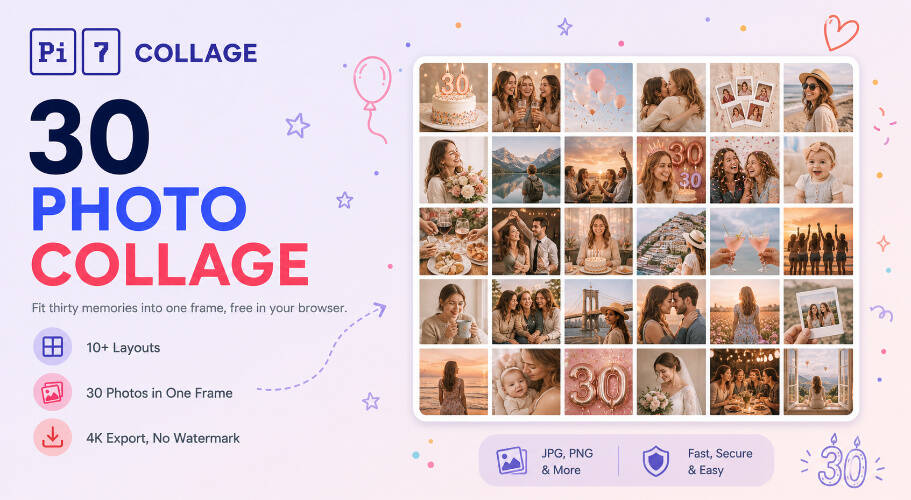
30 Years, 30 Days, 30 Frames: Pick the Story
Thirty is the magic number for milestone stories - not so few that you have to leave moments out, not so many that the eye stops reading individual shots. A 30-photo collage works because the viewer can take in the whole image at a glance, then dwell on individual frames as memories surface. A 100-photo grid loses that intimacy; a 12-photo grid leaves the story feeling thin.
Pick the 30-photo collage for milestone moments. For grouped storytelling like a year-in-review or family yearbook, the 12 photo collage maker ships with 7+ layouts including a 12-months scrapbook. Pi7's 5-photo grids cover tighter highlight reels, and for loose, layered compositions where photos overlap and tilt, our scrapbook-style templates are the better pick. Uniform grid-only layouts without headlines or themed decorations are the cleanest format for catalogue-style spreads.
From Camera Roll to Posted Collage in Two Minutes
From your phone to a posted 30 photo collage in under two minutes.
Pick a 30-photo layout
5x6 grid for timeline feel, mosaic for dynamic story, birthday scrapbook for 30th bday, polaroid stack for nostalgia. Tap any layout to open it pre-built.
Drop in 30 photos, edit text
Tap each cell to upload from your phone or computer. Drag to reorder, rotate, crop. Tap any headline to rewrite it - all text on every template is editable.
Export and share
Save as PNG or JPEG up to 4K, then post to Instagram, send on WhatsApp, or print at home. No upload to our servers, no watermark, no signup.
Stories Worth Thirty Photos
Where 30 photos in one frame earns its keep.
Print at 8x12, Post at 1080: Sizes That Survive 30 Photos
30 photos in one frame demand a thoughtful canvas size or individual photos turn into thumbnails. For Instagram feed, the 1080x1080 square keeps each of the 30 photos at roughly 180x180px - readable on any phone. For Stories and WhatsApp status, the 1080x1920 vertical works best with the 6x5 layout (180x384px per cell). For print, the 2400x3600 at 300 DPI exports cleanly to an 8x12 photo print, and the 4K canvas handles 12x18 framed prints without pixel loss.
Pi7's editor includes presets for all of these. Pick the share destination, the canvas auto-resizes, and the layout reflows to keep each of the 30 photos at the right scale. No manual aspect-ratio math.
Your Memories, Your Device - Nothing Leaves Your Browser
Privacy is not an afterthought here - the whole tool is engineered around it. The photos that go into a 30 photo collage are usually the most personal: family across the years, the baby's first month, the trip with friends, the wedding. We do not think those should pass through a third party's server just so you can stitch them together. So they do not.
Most online collage tools work by uploading your 30 photos to a server, processing them in the cloud, then handing back the finished image. Pi7 does the opposite. Every photo you drop in is read locally by JavaScript and rendered to a canvas inside your own browser. The pixels never travel - not to us, not to a CDN, not to a third-party processor.
No Account, No Upload, No Watermark
No signup, no email, no account creation, no waiting on an upload bar even for 30 high-resolution phone photos. Open the tab, build the collage, export the image, close the tab - and the session is gone. There is no copy of your 30 photos on a server somewhere being indexed, sold to model training, or sitting in an archived backup.
The practical knock-on benefits: it is fast (no upload time, even for 30 photos at 5 MB each that would total 150 MB on a server-based tool), it works offline once the page is loaded, there is no rate limit because there is no shared backend to throttle, and no watermark on the export because there is no premium tier to upsell into. If you have a couple dozen 30-photo collages to make - for a yearbook, a wedding album, a birthday slideshow - none of that pressure exists.
Questions About 30-Photo Collages
How many photos can fit in one collage on Pi7?
Up to 50 photos in a single collage. The 30 photo layouts (5x6 grid, 6x5 vertical, mosaic spread) are tuned to keep each photo readable at common share sizes - 1080x1080 for Instagram, 1080x1920 for Stories, 4K for print at 8x12 or larger.
What is the best layout for a 30th birthday collage?
For a 30th birthday, the scrapbook spread or mosaic layout works best - one photo per year of life, arranged loosely with room for a script-font "30" headline. The 5x6 grid is cleaner and more uniform if you want a chronological timeline feel from earliest to most recent.
Are my 30 photos uploaded anywhere?
No. Every photo stays on your device. Pi7 reads files locally using JavaScript, builds the 30 photo collage in your browser, and exports the final image without any of it ever leaving your phone or computer. No signup, no email, no upload.
Ready to make your 30 photo collage?
10+ layouts. No signup. Nothing uploaded. Free forever.
Open the editor