Family Photo Collage Maker - Tree, Wall, Yearbook
Hold generations in one image. 10+ family layouts including a tiered family tree, 3x3 yearbook grid, reunion mosaic, magazine spread, and themed family scrapbook. Free, browser-based, exports at print-ready 4K for the wall frame.
Make a Family CollageFamily Photo Collage: Generations in One Frame
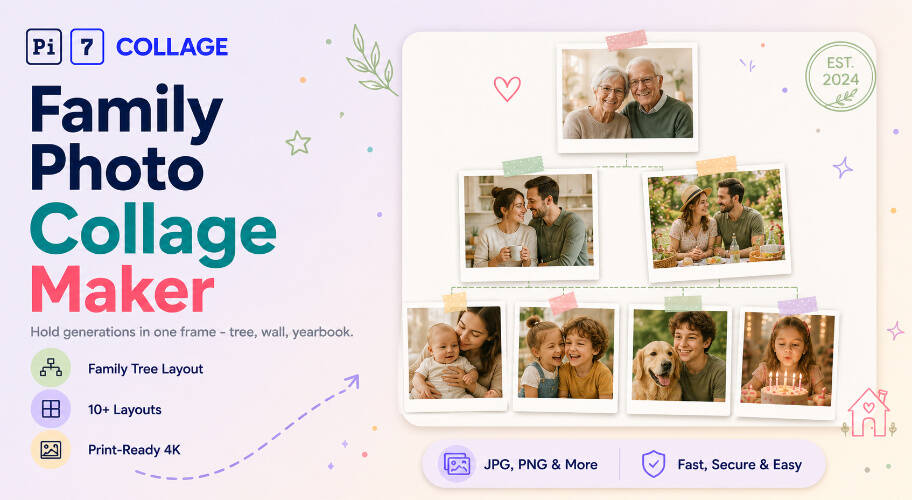
Pi7 makes a family photo collage online in under a minute with 10+ ready layouts including a tiered family tree (3 generations, 7 cells), 3x3 yearbook grid, reunion mosaic, magazine spread with one hero shot, and a themed family scrapbook on cream paper. Free, browser-based, exports at print-ready 4K.
A family photo collage works because it holds generations in one image without the carousel-tap fatigue. Grandparents at the top, parents in the middle, kids and grandkids below, all readable at a glance. Pick the family tree layout when the relationships matter, the 3x3 grid when the immediate family is the story, the reunion mosaic when the whole extended family fits in one print. Each layout opens in the editor with cells already positioned. Drop photos in, drag to reorder, apply one shared filter across the whole family for visual continuity, export at wall-print quality.
- Family tree - 3-tier hierarchy for 3 generations
- 3x3 yearbook grid - clean square, Instagram-ready
- Reunion mosaic - up to 16 photos in one frame
- Themed family scrapbook with cream paper
- Crop, rotate, resize each photo independently
- One filter across the whole family for visual unity
- Per-photo brightness, contrast, saturation
- Drag any photo to swap cells in seconds
- 2400x3600 at 300 DPI for 8x12 framed prints
- 3600x5400 for 12x18 wall art
- 1080x1080 square for Instagram feed posts
- Custom canvas with lock-aspect cells
Six Family Layouts: From Tree to Reunion
Six family-shaped layouts to start from. Each opens in the editor with the cells already positioned. Drop your photos in.
Three Family Tree Designs, Three Aesthetics
Pi7 ships three family tree templates tuned for different gift moments. Botanical Roots is the soft sage-and-cream default: seven photos across three generations, hand-drawn branch curves linking each tier, small leaf clusters at every junction, and a "rooted in love" footer in handwriting script. The most-given gift template - works for anniversaries, housewarming, grandparent gifts.
Heritage Pedigree takes the formal route: nine photos in a strict 1-2-2-4 ancestral pyramid on aged paper, gold double-rule dividers between generations, ornate corner flourishes, a "THE HOUSE OF [SURNAME]" ribbon banner, and a wax-seal stamp in the bottom-right. The genealogy / reunion / heirloom template.
Monogram Manor is the modern luxury option. Six photos arranged around a single oversized ivory-and-navy monogram letter with brass detail lines. No tree imagery, no leaves, no scrolls - the surname does all the work. The wedding-gift / Instagram-shareable / gallery-wall template for buyers who find botanical or heritage styles too "craft fair".
For an immediate family of 6-9 without tree structure, swap to the 3x3 grid or bento layout. For a full reunion with cousins and in-laws, the 4x4 grid handles 16 people in one frame. Each tree template marks who came first; the grid options treat every family member as equal cells.
From Camera Roll to Frame on the Wall
From your phone to a printed family collage on the wall in under five minutes.
Pick a family layout
Family tree for hierarchical storytelling, 3x3 grid for the immediate family, reunion mosaic for the extended one, magazine spread when one family member leads. Tap a layout to open it pre-built.
Drop in photos, edit text
Tap each cell to upload from your phone or computer. Drag to reorder generations. Tap any headline to rewrite it with the family name, the year, or a memorial date. All text is editable.
Export for wall or web
Save as PNG or JPEG at 2400x3600 (300 DPI) for an 8x12 framed print, or 1080x1080 for Instagram. Send the file to an online photo printer or upload to your local print shop.
Three Ways Families Use a Collage
Where a family photo collage earns its frame.
Sized for the Wall, the Print, the Story
A family collage that lives on a wall needs different math than one that lives on a feed. For 8x12 framed prints, the 2400x3600 export at 300 DPI is the sweet spot - high enough that each face stays readable at arm's length, small enough to upload to any photo-print service. For 12x18 wall art, push to 3600x5400. For an Instagram post celebrating the family, the 1080x1080 square works best with the 3x3 grid (360x360 per cell).
Pi7's editor includes presets for all of these. Pick the share destination, the canvas auto-resizes, the layout reflows to keep each family member at the right scale. No manual aspect-ratio math for the parent ordering the print.
Family Photos Stay on Your Device
Privacy is not an afterthought here - the whole tool is engineered around it. Family photos are among the most personal anyone takes: kids, grandkids, faces, full names visible on birthday cakes, addresses visible in the background. We do not think those should pass through a third party's server just so you can stitch them into a collage. So they do not.
Most online family-collage tools work by uploading every photo to a server, processing them in the cloud, then handing back the finished image. Pi7 does the opposite. Every photo you drop in is read locally by JavaScript and rendered to a canvas inside your own browser. The pixels never travel - not to us, not to a CDN, not to a third-party processor. The family album stays in the family.
No Account, No Upload, No Watermark
No signup, no email, no account creation, no waiting on an upload bar. Open the tab, build the family collage, export the image, close the tab - and the session is gone. There is no copy of your family photos on a server somewhere being indexed, sold to model training, or sitting in an archived backup.
The practical knock-on benefits: it is fast (no upload time even for sixteen high-resolution reunion photos), it works offline once the page is loaded, there is no rate limit because there is no shared backend to throttle, and no watermark on the export because there is no premium tier to upsell into.
Questions About Family Photo Collages
What is the best layout for a family photo collage?
The 3x3 grid is the cleanest layout for an immediate family of 9. For three generations, the tiered family tree layout puts grandparents at the top, parents in the middle, and kids across the bottom. For a full reunion of 12-16 people, the 4x4 grid keeps each face readable at standard print sizes.
Can I print a family collage from Pi7?
Yes. Export at 2400x3600 (300 DPI) for an 8x12 photo print, or 3600x5400 for a 12x18 framed wall print. Pi7's export presets include common photo-print sizes; the file downloads straight to your device with no upload to any printing service.
Are my family photos uploaded anywhere?
No. Every photo stays on your device. Pi7 reads files locally using JavaScript, builds the family collage in your browser, and exports the final image without any of it leaving your phone or computer.
Ready to make your family collage?
10+ layouts. No signup. Nothing uploaded. Free forever.
Open the editor